
Tổng Quan EA CopyTrade WebSocket
EA CopyTrade WebSocket (v3.40) là Expert Advisor hoạt động trên MetaTrader 5, chức năng sao chép lệnh tự động từ tài khoản Master sang tài khoản Slave qua kết nối WebSocket cực nhanh.
Đặc Điểm Nổi Bật
- WebSocket Real-time — Sử dụng WinHTTP WebSocket API gốc, độ trễ cực thấp (<100ms LAN, ~200-500ms WAN)
- Copy Mở / Đóng / Sửa — Tự động mở lệnh mới, đóng lệnh Master đã đóng, sửa SL/TP theo Master
- Global TP/SL Guardian — Bảo vệ tài khoản bằng cách đóng tất cả lệnh khi profit/loss đạt ngưỡng
- Auto-Retry — Tự động thử lại lệnh thất bại với exponential backoff
- Reconnect Tự Động — Watchdog 60s + exponential backoff khi mất kết nối
- Persistent Pause — Trạng thái pause được lưu qua GlobalVariable, giữ nguyên khi restart MT5
- Chart Panel UI — Hiển thị trực tiếp trên chart với thông tin kết nối, trạng thái, profit
- Bilingual — Hỗ trợ tiếng Việt và English
Yêu Cầu Hệ Thống
- MetaTrader 5 (build 3000+)
- Windows 10/11 (WinHTTP WebSocket API)
- Tài khoản broker hỗ trợ EA
Yêu Cầu Tài Khoản & Vốn
CẢNH BÁO RỦI RO: Sao chép lệnh và giao dịch luôn có rủi ro mất vốn. Hãy chắc chắn bạn hiểu rõ rủi ro trước khi sử dụng.
Loại Tài Khoản
Bắt buộc: Tài khoản phải là tài khoản Cent (đơn vị tính bằng cent).
| Loại | Đơn Vị | Ví Dụ |
|---|---|---|
| Cent | Cent (1/100 USD) | $10 = 1000 cent |
| Standard | USD | Không phù hợp |
Đòn Bẩy
Yêu cầu: Tối thiểu x1000, khuyến nghị vô cực (Unlimited).
| Đòn Bẩy | Phù Hợp |
|---|---|
| x1000 | Tối thiểu chấp nhận được |
| x2000 | Khá tốt |
| Unlimited | Tốt nhất (khuyến nghị) |
Vốn Bắt Đầu
Lưu ý quan trọng: Vì tài khoản Cent, vốn thể hiện dưới dạng cent. 1 USD = 100 cent.
| Loại Tài Khoản | Vốn Bắt Đầu | Hiển Thị Trong MT5 |
|---|---|---|
| Cent (Live) | $2,000 | 200,000 cent |
| Demo (Test) | $200,000 | 200,000 |
QUAN TRỌNG: Tài khoản demo cần $200,000 (200,000) để test vì lot size sẽ khác với tài khoản Cent live. Kết quả demo không đảm bảo kết quả live.
Tóm Tắt
| Yêu Cầu | Chi Tiết |
|---|---|
| Loại tài khoản | Cent |
| Đòn bẩy | Tối thiểu x1000, khuyến nghị Unlimited |
| Vốn live | $2,000 (hiển thị 200,000 cent) |
| Vốn demo test | $200,000 |
| Rủi ro | Luôn có rủi ro mất vốn khi sao chép và giao dịch |
Cài Đặt EA
Bước 1: Tải File EA
- Nhấn nút "Download EA Copy Trade" trên cùng trang web
- File sẽ được tải về dạng
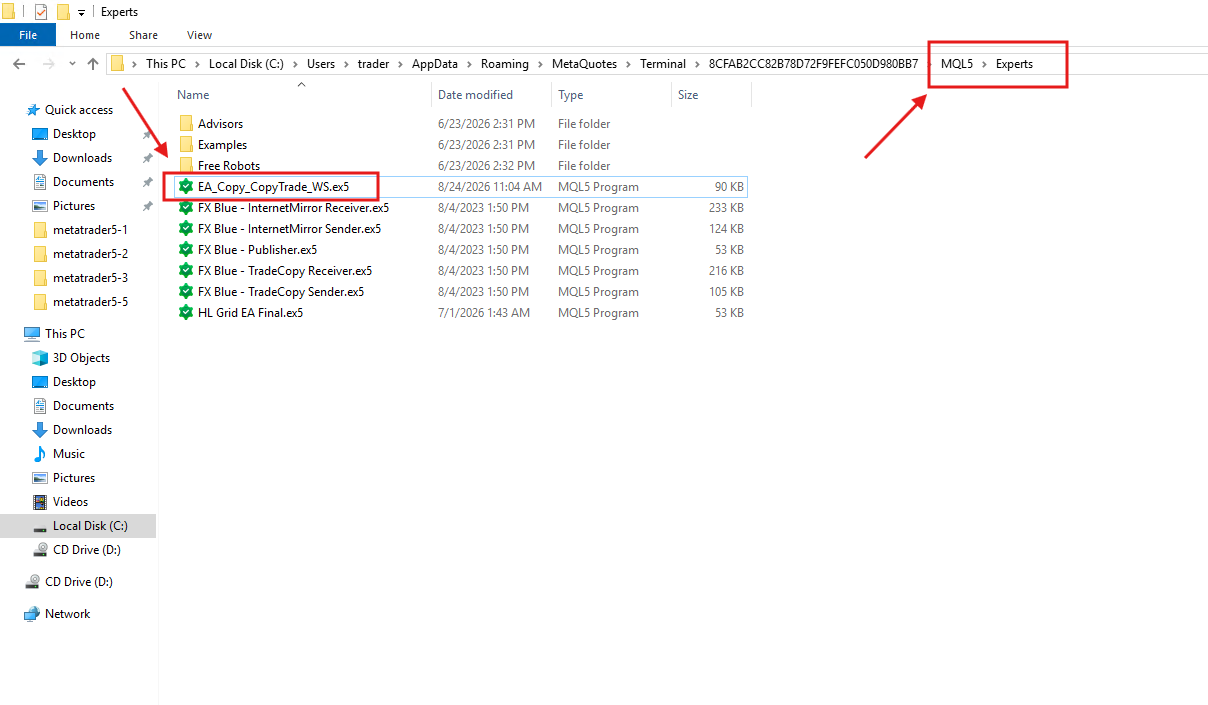
.ex5(đã build sẵn, không cần compile) - Mở MT5 → File → Open Data Folder → MQL5 → Experts
- Copy file
EA_Copy_CopyTrade_WS.ex5vào thư mụcExperts
Bước 2: Cài Đặt Trên Chart
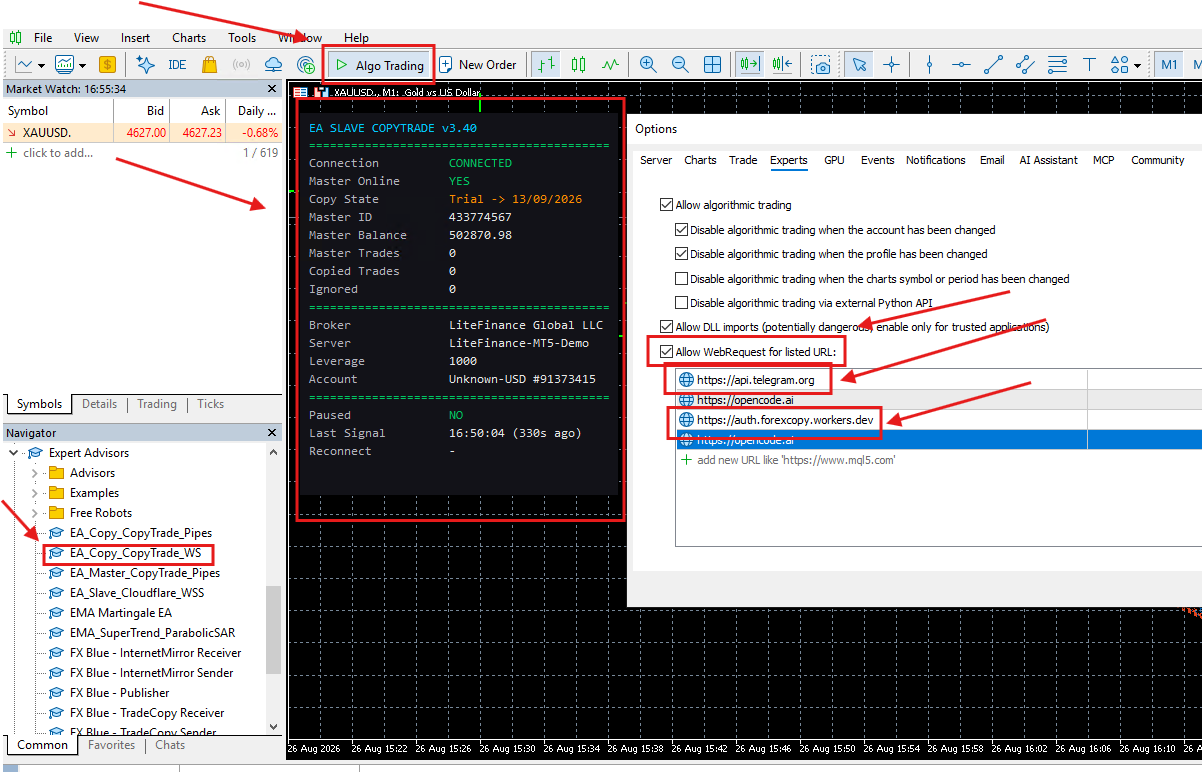
- Mở MT5 → Navigator (Ctrl+N) → Expert Advisors
- Kéo
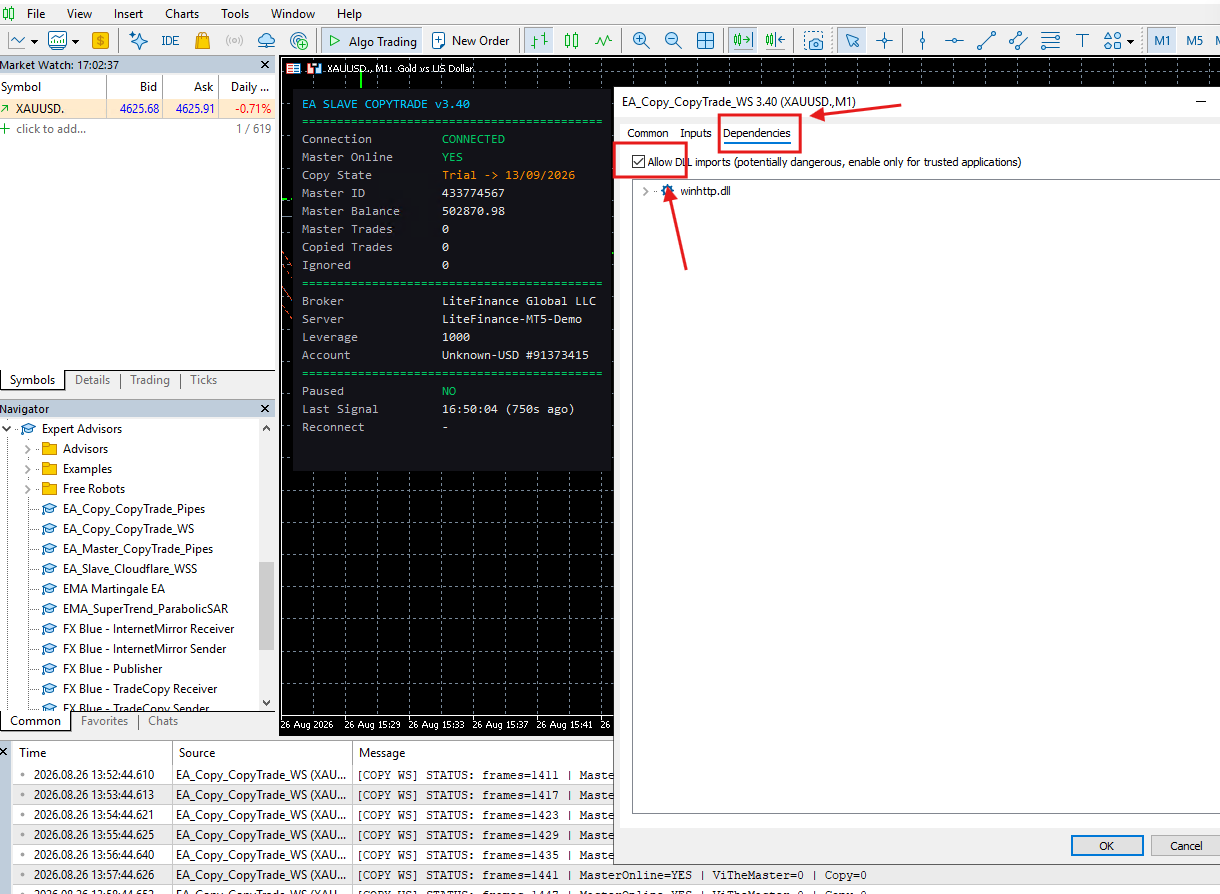
EA_Copy_CopyTrade_WSvào chart muốn copy - Hộp thoại hiện ra → vào tab "Common" → tick:
- Allow Algo Trading
- Allow DLL imports (bắt buộc)
- Vào tab "Inputs" → cấu hình tham số
- Nhấn OK
Bước 3: Cấu Hình WebRequest (Quan Trọng)
Bắt buộc: Phải thêm URL Server vào danh sách WebRequest trước khi EA có thể kết nối.
- MT5 → Tools → Options → Expert Advisors
- Tick "Allow WebRequest for listed URL"
- Thêm URL sau vào danh sách:
https://auth.forexcopy.workers.devhttps://ea.forexcopy.workers.devhttps://api.telegram.org
- Nhấn OK → Restart MT5
Bước 4: Kiểm Tra
- Mở chart với EA đã cài
- Kiểm tra tab Experts ở dưới → thấy log "Master1 đã kết nối"
- Kiểm tra tab Journal → không có lỗi đỏ
- Panel trên chart hiển thị: Copy State: Waiting Active hoặc Connected
Cấu Hình Kết Nối
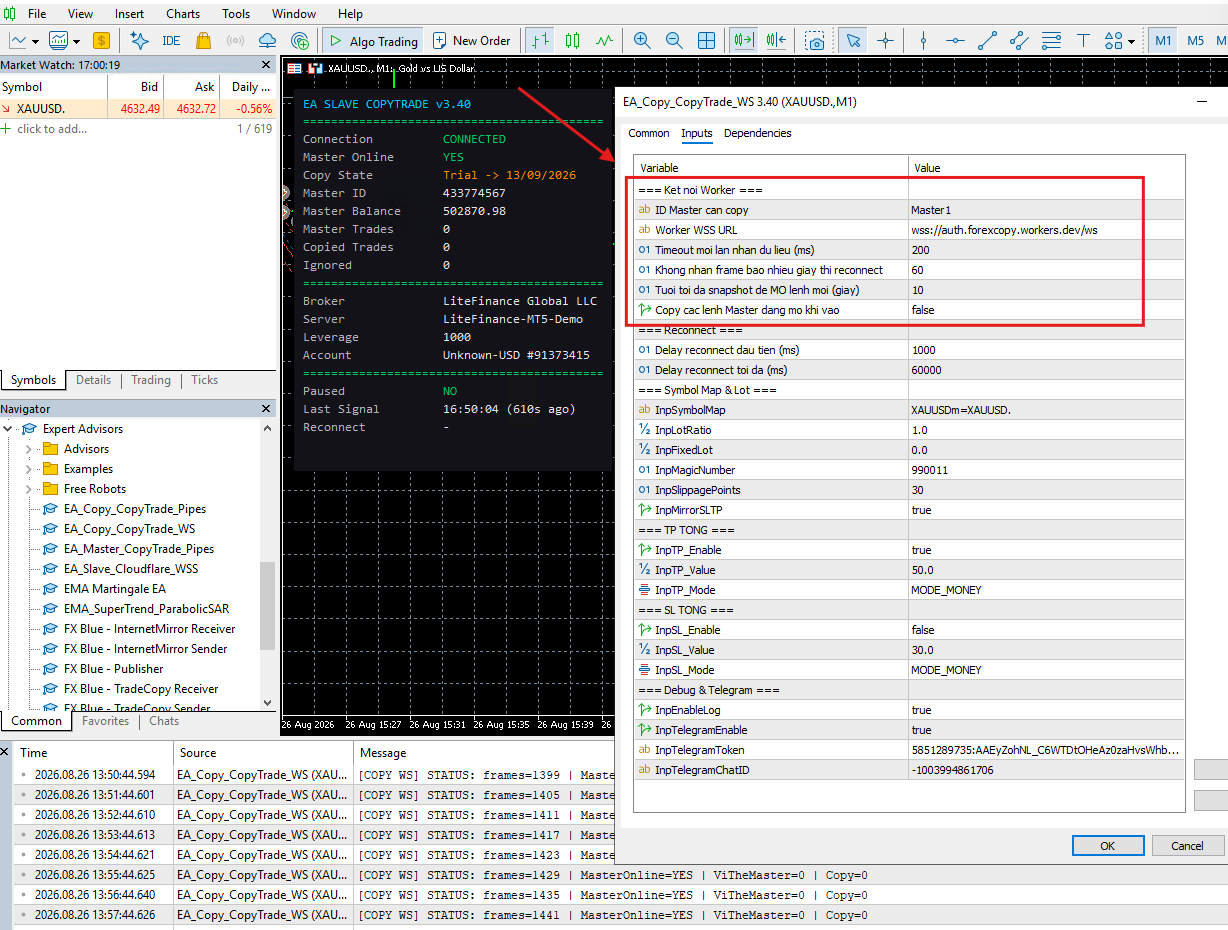
Tham Số Kết Nối
| Tham Số | Giá Trị Mặc Định | Mô Tả |
|---|---|---|
| InpMasterID | "Master1" | ID Master cần copy |
| InpWorkerWSSUrl | wss://auth.forexcopy.workers.dev/ws | WebSocket URL |
| InpRecvTimeoutMs | 200 | Receive timeout (ms) |
| InpSilenceWatchdogSec | 60 | Watchdog timeout (sec) |
| InpCopyExistingOnStart | false | Copy lệnh đang mở khi khởi động |
Các Bước Cấu Hình
- Mở MT5 → Navigator → Expert Advisors
- Kéo EA vào chart → hiện hộp thoại Inputs
- Nhập
InpMasterID= ID Master (ví dụ: "Master1") - Nhập
InpWorkerWSSUrl= URL Server - Các tham số khác giữ mặc định hoặc tu chỉnh
- Nhấn OK
Reconnect Strategy
Exponential backoff: 1s → 2s → 4s → 8s → 16s → 32s → 60s → ...
InpReconnectBaseMs= 1000 (delay ban đầu)InpReconnectMaxMs= 60000 (delay tối đa)
Kiểm Tra Kết Nối
- Panel trên chart hiển thị: Master Online: YES = kết nối thành công
- Tab Experts: thông báo "CONNECTED" và "Master Online: YES"
- Copy State: "Waiting Active" hoặc "Active"
Global TP/SL Guardian — Bảo Vệ Tài Khoản
Guardian là tính năng quan trọng nhất để bảo vệ tài khoản. Nó hoạt động liên tục, kể cả khi WebSocket mất kết nối.
Cơ Chế Hoạt Động
- Mỗi tick — EA tính tổng lợi nhuận NET = Profit + Swap + Commission của tất cả lệnh có Magic Number trùng khớp
- So sánh — Nếu profit ≥ TP ngưỡng → ĐÓNG TẤT CẢ
- So sánh — Nếu loss ≥ SL ngưỡng → ĐÓNG TẤT CẢ
- Pause — Sau khi đóng, EA tạm dừng copy (paused) cho đến khi Master đóng hết lệnh
3 Chế Độ Tính Toán
| Chế Độ | Công Thức | Ví Dụ |
|---|---|---|
MODE_MONEY | TP/SL = giá trị tiền trực tiếp ($) | InpTP_Value = 50 → Đóng khi lãi $50 |
MODE_PERCENT_BALANCE | TP/SL = Balance × value / 100 | Balance $1000, value = 5 → Đóng khi lãi $50 (5%) |
MODE_PERCENT_EQUITY | TP/SL = Equity × value / 100 | Equity $1000, value = 10 → Đóng khi lỗ $100 (10%) |
Hành Vi Pause / Unpause
- Khi TP hoặc SL trigger → EA đóng tất lệnh có Magic Number → Pause = true
- EA tiếp tục theo dõi snapshot từ Master
- Khi Master đóng hết lệnh (MasterPosCount = 0) → Unpause → Tiếp tục copy
- Trạng thái pause lưu qua
GlobalVariable→ giữ nguyên nếu restart MT5
Lưu ý: Guardian tính NET PROFIT = Profit + Swap + Commission. Commission đọc từ lịch deal (HistoryDealGetDouble).
Ví Dụ Cấu Hình
Ví Dụ 1: TP = $100
InpTP_Enable  = true
InpTP_Value   = 100
InpTP_Mode    = MODE_MONEY
InpSL_Enable  = false
Ví Dụ 2: SL = 5% Balance
InpTP_Enable  = true
InpTP_Value   = 50
InpTP_Mode    = MODE_MONEY
InpSL_Enable  = true
InpSL_Value   = 5
InpSL_Mode    = MODE_PERCENT_BALANCE
Symbol Mapping & Tính Toán Lot
Symbol Mapping
Nhiều broker đặt tên symbol khác nhau cho cùng sản phẩm. EA hỗ trợ ánh xạ tự động.
| Master Symbol | Slave Symbol | InpSymbolMap |
|---|---|---|
| XAUUSDm | XAUUSDc | XAUUSDm=XAUUSDc |
| EURUSDm | EURUSDc | EURUSDm=EURUSDc |
| GER40 | DE40 | GER40=DE40 |
Khi không cần map: Nếu Master và Slave dùng cùng tên symbol → để trống. EA tự dùng tên gốc.
Nhiều Cặp
InpSymbolMap = "XAUUSDm=XAUUSDc,EURUSDm=EURUSDc,GBPUSDm=GBPUSDc"
Tính Toán Lot
| Chế Độ | Điều Kiện | Công Thức |
|---|---|---|
| Lot Tỷ Lệ | InpFixedLot = 0 | Lot = Master Volume × InpLotRatio |
| Lot Cố Định | InpFixedLot > 0 | Lot = InpFixedLot (bỏ qua Master Volume) |
Auto-Rounding
Sau khi tính, EA tự động: (1) Làm tròn theo SYMBOL_VOLUME_STEP (2) Đảm bảo ≥ MIN (3) Đảm bảo ≤ MAX
Ví Dụ
| Master Lot | Ratio | Fixed | Min | Step | Kết Quả |
|---|---|---|---|---|---|
| 0.10 | 1.0 | 0 | 0.01 | 0.01 | 0.10 |
| 0.10 | 2.0 | 0 | 0.01 | 0.01 | 0.20 |
| 0.33 | 0.5 | 0 | 0.01 | 0.10 | 0.20 (step) |
Comment Nhận Biết Lệnh Copy
cp_[MasterTicket]
Ví dụ: Master ticket #12345 → comment cp_12345. Phân biệt lệnh copy và recover map khi restart.
Xử Lý Sự Cố (Troubleshooting)
1. EA Không Khởi Động Được
| Lỗi | Nguyên Nhân | Giải Pháp |
|---|---|---|
| "Allow DLL imports" error | Chưa bật Allow DLL | Tools → Options → Expert Advisors → Tick "Allow DLL imports" |
| "Allow WebRequest" error | Chưa thêm URL Server | Thêm https://auth.forexcopy.workers.dev vào danh sách WebRequest |
| Compile error | File .ex5 bị lỗi hoặc thiếu | Re-download file mới từ nút tải trên cùng |
| "wss://" error | InpWorkerWSSUrl không đúng định dạng | Phải bắt đầu bằng wss:// |
2. Kết Nối Thành Công Nhưng Không Copy
| Triệu Chứng | Nguyên Nhân | Giải Pháp |
|---|---|---|
| Copy State: "Waiting Active" | Chưa được kích hoạt | Kiểm tra Master ID, kiểm tra Dashboard |
| Master Online: NO | Master chưa kết nối hoặc mất | Đảm bảo Master EA đang chạy và kết nối Server |
| Copy State: "End Trial" | Hết hạn Trial | Gia hạn Trial hoặc chuyển sang Active |
| Ignored tăng dần | Symbol không hỗ trợ hoặc lot không hợp lệ | Kiểm tra Symbol Map, lot min/max |
3. Kết Nối Bị Mất / Reconnect
- Watchdog 60s: Nếu Server không gửi frame trong 60s → EA tự reconnect
- Exponential Backoff: 1s → 2s → 4s → ... → 60s (tối đa)
- Log kiểm tra: Experts tab hiển thị "KHÔNG NHẬN FRAME" hoặc "reconnect"
4. Lỗi Symbol / Lot
| Vấn Đề | Giải Pháp |
|---|---|
| Symbol không tồn tại trên Slave | Thêm vào Symbol Map hoặc đảm broker hỗ trợ |
| Lot nhỏ hơn min lot | EA tự đặt lên SYMBOL_VOLUME_MIN |
| Lot lớn hơn max lot | EA tự giảm xuống SYMBOL_VOLUME_MAX |
| Không đủ margin | TRADE_RETCODE_NO_MONEY → lệnh bị ignore |
5. TP/SL Guardian Không Hoạt Động
- Kiểm tra:
InpSL_Enable = falsemặc định → phải bật thủ công - Kiểm tra:
InpMagicNumbertrùng khớp với lệnh cần kiểm tra - Kiểm tra: InpTP_Mode / InpSL_Mode dùng chế độ nào (tiền hay %)
6. Tín Hiệu Telegram Không Gửi Được
| Triệu Chứng | Nguyên Nhân | Giải Pháp |
|---|---|---|
| Telegram không nhận tin nhắn | Chưa bật InpTelegramEnable | Đặt InpTelegramEnable = true |
| Telegram không nhận tin nhắn | Token hoặc Chat ID sai | Kiểm tra InpTelegramToken và InpTelegramChatID |
| WebRequest error / không gửi được | Chưa thêm URL Telegram | Thêm https://api.telegram.org vào danh sách WebRequest |
Hướng dẫn: MT5 → Tools → Options → Expert Advisors → Tick "Allow WebRequest for listed URL" → Thêm
https://api.telegram.orgTất Cả Tham Số (Master Reference)
| Nhóm | Tham Số | Mặc Định | Mô Tả |
|---|---|---|---|
| Kết Nối | InpMasterID | "Master1" | ID Master cần copy |
| InpWorkerWSSUrl | wss://auth.forexcopy.workers.dev/ws | WebSocket URL | |
| InpRecvTimeoutMs | 200 | Receive timeout (ms) | |
| InpSilenceWatchdogSec | 60 | Watchdog timeout (sec) | |
| InpMaxSignalAgeSec | 10 | Tuổi tối đa snapshot (sec) | |
| InpCopyExistingOnStart | false | Copy lệnh đang mở khi khởi động | |
| Reconnect | InpReconnectBaseMs | 1000 | Delay ban đầu (ms) |
| InpReconnectMaxMs | 60000 | Delay tối đa (ms) | |
| Symbol/Lot | InpSymbolMap | XAUUSDm=XAUUSDc,EURUSDm=EURUSDc | Ánh xạ symbol |
| InpLotRatio | 1.0 | Tỷ lệ lot | |
| InpFixedLot | 0 | Lot cố định (0 = tỷ lệ) | |
| InpMagicNumber | 990011 | Magic Number | |
| InpSlippagePoints | 30 | Slippage tối đa (points) | |
| InpMirrorSLTP | true | Đồng bộ SL/TP từ Master | |
| TP | InpTP_Enable | true | Bật Global TP |
| InpTP_Value | 50 | Ngưỡng TP | |
| InpTP_Mode | MODE_MONEY | MONEY / %BAL / %EQUITY | |
| SL | InpSL_Enable | false | Bật Global SL |
| InpSL_Value | 100000 | Ngưỡng SL | |
| InpSL_Mode | MODE_MONEY | MONEY / %BAL / %EQUITY | |
| Debug | InpEnableLog | true | Bật log Expert |
| InpTelegramEnable | false | Bật Telegram | |
| InpTelegramToken | "" | Bot Token | |
| InpTelegramChatID | "" | Chat ID |
Kích Hoạt & Giấy Phép Sử Dụng
EA CopyTrade WS có thể sử dụng MIỄN PHÍ với các tài khoản Exness được đăng ký qua link liên kết của chúng tôi.
Cách 1: Đăng Ký Tài Khoản Mới (MIỄN PHÍ)
- Nhấn nút bên dưới để đăng ký tài khoản Exness mới qua link liên kết
- Hoặc sử dụng mã đối tác:
5ybeugnpyg - Sau khi đăng ký → mở tài khoản Cent → bắt đầu sử dụng EA miễn phí
Mã đối tác:
5ybeugnpyg — Sử dụng mã này khi đăng ký hoặc liên hệ chăm sóc khách hàng Exness.Cách 2: Đổi Mã Đối Tác (Nếu Đã Có Tài Khoản)
- Đăng nhập vào tài khoản Exness hiện tại
- Liên hệ bộ phận chăm sóc khách hàng Exness
- Yêu cầu đổi mã đối tác thành:
5ybeugnpyg - Tạo tài khoản Cent để bắt đầu sử dụng EA
Cách 3: Dùng Thử (7 Ngày)
Không cần Exness: Bạn có thể dùng thử với bất kỳ tài khoản MT5 nào trong 7 ngày.
- Đăng ký tài khoản Demo tại bất kỳ broker nào hỗ trợ MT5
- Cài đặt EA → kết nối Server → sử dụng trong 7 ngày
- Sau 7 ngày → cần chuyển sang tài khoản Exness để tiếp tục
So Sánh
| Phương Thức | Chi Phí | Thời Hạn | Tài Khoản |
|---|---|---|---|
| Exness (link liên kết) | MIỄN PHÍ | Vĩnh viễn | Cent |
| Đổi mã đối tác | MIỄN PHÍ | Vĩnh viễn | Cent |
| Dùng thử | MIỄN PHÍ | 7 ngày | Bất kỳ |
LƯU Ý: SAO CHÉP LỆNH VÀ GIAO DỊCH LUÔN CÓ RỦI RO MẤT VỐN. Hãy chắc chắn bạn hiểu rõ rủi ro và chỉ sử dụng vốn bạn chấp nhận mất.